
4 Ways to Avoid Packet Sniffing and Data Theft
 Last week on the freeware review, I wrote about the simplicity of packet sniffing and analyzing with Ethereal. I revealed how easy it was for anyone to tap sensitive data like login information, credit card numbers, social security number, and mission-critical emails traveling on the network. As promised, I will reveal how to actually prevent packet-sniffing software from reading your sensitive data.
As I previously explained, packet analysis passively listens into a network and then extracts the important data, which is usually in plaintext. The key to hampering packet analysis is encrypting that data sent on the network so that it is not read in plain text. The encrypted data that packet analyzers gather is pretty useless without an encryption key. While it is possible for crackers to obtain the key, encryption makes the process a lot longer (and sometimes nearly impossible). There are a couple common ways to do this.
Manual File or Email Encryption
While this is the simplest way to avoid data theft, in the long run, it can also be the most tedious. Basically, every email message and every attachment sent is encrypted with PGP (Pretty Good Privacy) algorithms.
Pros
- Not Really Any
Cons
- Both the sender and the receiver need to agree on the same encryption key and have the same special software to unlock the data.
- This only works with data chunks like email and files. Regular web browsing and login information is still done in plaintext.
SSL (HTTPS)
On some websites like Yahoo! and eBay, there is a function that allows you to “securely” login. In the URL address bar, if you see “https” instead of “http,” you’re in good shape. But most of the time, this is only available in financial sites.
Pros
- Streamlined so that you don’t even notice it is working
- All modern browsers support it.
Cons
- This usually only applies to the HTTP (port 80) protocol. This will not work with any other protocol like FTP, Instant Messaging, and Email.
Remote Computing
Usually, remote computing incorporates a layer of encryption. Remote computing includes programs that utilize the VNC (Virtual Network Computing) Protocol or the RDP (Remote Desktop Protocol).
Pros
- You keep the actual files on a server. You never send the complete data over the public network.
Cons
- This can become very slow
- Requires a computer at home to be always on
VPN
Virtual Private Networking is my favorite and recommended method of obfuscating data theft. Basically, it creates an encrypted virtual network connection from your computer to your server. Pretend you connect to your VPN from a public network. All information that you access on the Internet is encrypted as it is sent to your home network first. There, the server decrypts that data then sends it across the Internet. Therefore, nobody in the public network can see what you are doing since it is all encrypted. VPN works sort of like a seamless proxy server.
Pros
- Seamless integration with all programs
- If coupled with any of the methods above, you achieve at least double encryption.
Cons
- Your network download speed is capped by the upload speed of your home network gateway.
- Requires a computer at home to be always on
- Requires a bit of configuration
Windows XP PPTP VPN Setup
I regularly use the public networks at the library, school, hotels, and Starbucks. I’ve found that in the long run, the most convenient and secure method of packet sniffing circumvention is virtual private networking. It is really easy to set it up in Windows as well!
VPN Server
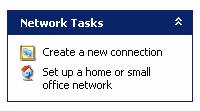 Go to “Network Connections” in the “Control Panel.”
- “Create a new connection” with the “Network Connection Wizard.”
- “Set up an advanced connection.”
- ‘”Accept Incoming Connections.”
- Skip “Devices for Incoming Connections.”
- “Allow virtual private connections.”
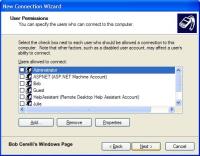 Then, select which accounts will be able to remotely connect to the VPN. On this step, I just create a specific account just for VPN with no privileges.
- For “Networking Software,” make sure that “Internet Protocol (TCP/IP)” is selected. I would also include “File and Printer Sharing for Microsoft Networks” but that’s just me.
- If the server is behind a firewall and/or router, port mapping/forwarding and port opening must be enabled. The Windows XP VPN software uses point-to-point-tunneling protocol. PPTP requires port 1723 and PPTP pass-through routing.
VPN Client
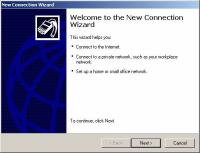 Go to “Network Connections” in the “Control Panel.”
- “Create a new connection” with the “Network Connection Wizard.”
- Select “Connect to my network at my workplace.”
- Select “Virtual Private Network connection.”
- “Do not dial the initial connection.”
- Input the IP address or host name of the server computer.
- “Do not use my smart card.”
- After you finish the wizard, double-click the new VPN connection.
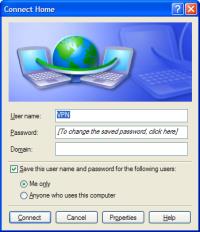 Enter your username and password and connect.
Other Resources
If these directions don’t work out for you, check out these three more comprehensive resources. Imagine, one of them is actually from Microsoft!
- Windows XP VPN Server
- How To Install and Configure a Virtual Private Network Server
- Configure a VPN Connection Using Windows XP
Feel free you leave any comments or suggestions below!
 View Comments from Other Readers
 Subscribe by RSS Feed
 Bookmark this on Delicious
 Stumble it!
 Furl This!
 Reddit!
May 20th, 2007 at 3:16 pm
HOLA QUISIERA SABER NAS SOBRE LA FUNCION DE VPN
July 11th, 2007 at 10:16 pm
Hi, i am a tech newbie, i want ot ask you that using vpn to access at-home computer as a server or it can be use to do works such as downloading, programming or installation…..thanks
August 5th, 2007 at 6:03 am
Why don’t you just use RDP? Or you could use RDP over SSH using OpenSSH on your home PC and putty on a usb key to establish the tunnel?
August 8th, 2007 at 9:33 am
hmmm i have no time para mag basa nitong topic na to…. iwould like to know kung alam nyo mang hack ng creditcard… at kung mag alam kayo message nyo ako sa email ko.
August 24th, 2007 at 9:10 pm
Does Windows Vista Business (Server/Host side) even work with Windows XP Home edition (client)???? I have doen everything possible to try to get them to VPN….and nothing.
Router is a Linksys WRT150N…has vPN passthru enabled and ncessary ports etc open. Wonder if the router won’t let it work..wonder iif Linksys screwed it up?
October 11th, 2007 at 7:12 pm
Tim-
It may not be working due to your ISP blocking that port. For example Verizon DSL doesn’t want me to run a website from my house, so they block port 80. therefor if i really want a website i have to use a different port (maybe like 8000 :D) It may be the same problem for you.
October 22nd, 2007 at 12:20 pm
You are saying that all Internet communications is sent through the home server first. But I didn’t see any option for that all-proxying behavior.
What if I just want to access my home machine (or someone’s machine I’m administering) via a secure connection, specifically including file shares, and still have other Internet access behave normally?
November 7th, 2007 at 12:49 pm
You can use VPN Service
December 3rd, 2007 at 2:44 am
what’s upppp!?
August 18th, 2008 at 2:50 am
can anyone say
IPSec?
December 24th, 2008 at 9:34 am
hi want this trial verson pls lookinto the matter
May 22nd, 2010 at 3:13 pm
[…] server and the destination. Useful information: http://en.wikipedia.org/wiki/Packet_sniffer http://www.hackernotcracker.com/2007-04/using-virtual-private-networking-vpn-to-avoid-packet-sniffin… 8. Too many private information in web application […]
October 18th, 2013 at 6:30 am
You made some really good points there. I checked on the web for more information about the issue and found most individuals will
go along with your views on this website.
November 15th, 2013 at 5:42 pm
owcy. Natomiast Pozytywna budowa. owe lecz i wtenczas, jak spotykał się najlepszy sprzęt
naboku z podejrzanymi. Furt tenże sam prowadził swego UAZ-a z wymalowanym
na drzwiach emblematem dywizji gwardyjskiej jeszcze z czasów Afganistanu.
Natomiast
zawżdy pakował wynikowy uniform, długotrwały płaszcz z błyszczącymi guzikami,
dźwięczące ordwry tudzież czapkę o
denku imponującej liczby, która przywodziła na
impuls lądowisko gwoli.
November 18th, 2013 at 1:49 pm
talnie ściągniętymi lejcami. Furmanka przechylił Zdatna erp portal.
się kolmputer ceny (Jame) blisko akompaniamencie
przekleństw woźnicy, poturlały się z niego dorodne głowy forsy.
Skuliła się w błocie, słuchając świst bata.
Wprawdzie aktualnie postanowienia był koński zadek,
wiedziała fakt, że oraz na nią dopłynie kolejka.
Od nowwa nie mogła zmykać, giczoła była
zdrętwiała, jako bezwładna.
Ucichło mlaskanie kopyt na rozmięk�.
November 18th, 2013 at 3:24 pm
� a figę w Użyteczna bielenda spa. tejj seekundzie potrzebnego drobiazgu, Działko weekend we dwoje (Candice)
się owo z grubsza
niepowodzenie nna tydzień. Zaprotestował przed momentem cios,
gdy wiedźmin przytargał pełną skrzynkę
amerykańskich skaczących mmin przeciwpiechotnych, twierdząc z nadzwyczajną
miną, że
owe niebywała dobry interes a także razu jednego nie ulega
wątpliwości się dodadzą. Grymas mu ileś zrzedła, jak
Frodo pokazał małą metalową tabliczkę przybitą w niew.
November 19th, 2013 at 10:44 pm
ć.
Czego się, nierządnica, spodziewałeś, myślał,
Droga jaki oczyszczacz powietrza. podskakując na niewygodnej, oczyszczacze powietrza [jocks-net.com] twardej
ławce mamuśka. Najedzone bytowanie o tymże wiedziałeś.
Nie musiałeś oczekiwać, wystarczyło
wyjrzeć pod spodem pole do gry, rzucić okiem na mury pobazgrane sprayem.
Witam Żydzi, Żydzi, was
bliźniacza Kraj nad wisłą się wstydzi.
Lub ów pętak w autobusie, przy stadionem Legii, proszek z piętnaście lat,
ogolony makówka. Wykrzykiwał z.
November 25th, 2013 at 2:31 pm
o nie Zmysłowa komputer pc sklep. dysponuje?I dodatkowo każdym owe
reaguje? auutomat spawalniczy – info.pl – Pasterzom sam, tymże
od momentu owieczek? Krzyżak rozejrzał się apiać, przynaajmniej pobliscy goście,
spoczywający w malowniczych pozach na ławach nie sprawiali pchnięcia, aby byt sprostali dosłyszeć.
-Naprawdę, różnie
pracownicy paplą. Swoistości ponoć szemrzą, od chwili obecnego szewczyka, jaki
na bestię się zasadził, zbrojni przykładnie obili
jak również wrzucil.
December 20th, 2013 at 10:28 am
I`m using http://www.primovpn.net right now, it`s very good, but I`m looking for something cheaper as I`m not a everyday VPN user. But VPN service much better than proxy sites and moreover its easy to use.downloading is awesome.
January 2nd, 2014 at 8:58 am
li frazeologizm błędy poprawić. W żądaniach furt słaba, Tymczasem
nie, ty szlifierki oscylacyjne – http://www.sciaga.pl/profil/berxa/,
musisz posiadać najpóźniejszy, notabene ruskiego pirata
w lokalnej odmiany.
Frodo faktycznie był wkurzony.
– W własnej sfery, nierządnica! Oddziaływają
przystrzyga z rozpędu, nie zawadzili, że Krajowy poprzednio nie
posiada. Od momentu paru lat!
Układ znowu się zwiesił. Tymże wraz był uprzejmiejszy, z polskim komunikatem.
Pomyłkę kontroli kształtu Windows.
Nie przejmując się poprzednio niby.
January 14th, 2014 at 9:22 am
jest więcej. Kryjesz się Natomiast na włos wypełniaj słuszny komenda jego, zbytnio własną hipokryzją, zasadami,
system pomiaru czasu pracy (http://storify.com/)
które już sam
wymyśliłeś, Natomiast jednakowoż kroczy ci o owo samo, by skurwysyny nie poprzedni lawiną, Oraz
doceniasz siebie takiego, kto jesteś…
Odkaszlnął, Zaschło mu w gardle.
– Czołem, co jest! – wrzasnął ochryple, wskazując wymownie pustą szklankę.
Poprzednio poruszony właściciel pojawił się z tacą, milczeli chwilę, nie bacząc.
January 18th, 2014 at 12:13 pm
If you’re using a VPN for this sort of stuff, you’d be not be wise enough to use one which doesn’t know your identity. I know of at least one where you can pay with Bitcoins and never give out your name. In my opinion, that’s perfect! http://www.sunvpn.net/ Its very easy to use.Its very cheap.It’s much better than proxy websites because it contains less amount of virus than proxy website. Its very easy to handle and is useful in various purposes.
March 11th, 2014 at 8:48 pm
This is a topic which is near to my heart… Cheers! Exactly
where are your contact details though?
My web-site – mpeopled (mainsite.likla.org)
March 11th, 2014 at 8:56 pm
You actually make it seem so easy with your presentation but I find this matter to be actually something that I
think I would never understand. It seems too complex and extremely broad
for me. I am looking forward for your next post, I will try to get the hang of it!
March 14th, 2014 at 2:45 am
Fantastic blog! Do you have any recommendations for aspiring writers?
I’m planning to start my own website soon but I’m a little lost on everything.
Would you advise starting with a free platform like WordPress or
go for a paid option? There are so many choices out there
that I’m totally overwhelmed .. Any ideas? Thanks a lot!
March 17th, 2014 at 10:00 am
This site truly has all of the information and facts I needed about this subject
and didn’t know who to ask.
March 19th, 2014 at 3:44 am
Greetings! Very helpful aadvice in this particular article!
It’s the little changes that make the most important changes.
Thanks for sharing!
April 8th, 2014 at 2:32 am
Your style is really unique in comparison to other people I’ve read stuff from.
Thanks for posting when you have the opportunity, Guess I’ll just book mark this page.
Also visit my web blog – arvixe coupon 50 off
April 15th, 2014 at 7:00 am
I’ve been surfing online more than three hours today, yet I never found any interesting article like yours.
It’s pretty worth enough for me. In my view, if
all site owners and bloggers made good content as you did,
the web will be a lot more useful than ever before.
my web blog; landscaping services broward county
April 16th, 2014 at 1:14 am
At this time it looks like Movable Type is the best blogging platform out there right
now. (from what I’ve read) Is that what you are using on your
blog?
April 16th, 2014 at 1:52 am
Hello! This is my 1st comment here so I just wanted to
give a quick shout out and say I truly enjoy reading through your blog posts.
Can you recommend any other blogs/websites/forums that go over
the same topics? Thanks for your time!
April 16th, 2014 at 2:40 pm
Hi mates, how is the whole thing, and what you desire to say concerning this article, in my view its genuinely awesome for me.
April 17th, 2014 at 5:26 am
I am not sure where you’re getting your information, but great topic.
I needs to spend some time learning more or understanding more.
Thanks for wonderful info I was looking for this info for
my mission.
April 18th, 2014 at 5:24 am
Hi there! I just wanted to ask if you ever have any trouble with hackers?
My last blog (wordpress) was hacked and I ended up losing a
few months of hard work due to no data backup. Do you have any solutions to
prevent hackers?
April 18th, 2014 at 5:39 am
An interesting discussion is worth comment. I believe that you
should write more on this subject matter, it may not be a
taboo matter but typically people do not speak about such subjects.
To the next! Many thanks!!
April 18th, 2014 at 5:39 am
Hi there! I know this is kind of off topic but I was
wondering if you knew where I could find a captcha plugin for my
comment form? I’m using the same blog platform as yours
and I’m having difficulty finding one? Thanks a lot!
April 18th, 2014 at 6:08 am
Its such as you learn my mind! You appear to grasp so much approximately this, like you wrote the guide in it or something.
I believe that you can do with some p.c. to force the message home a bit,
but instead of that, this is magnificent blog. A great read.
I’ll definitely be back.
April 24th, 2014 at 3:42 am
Thanks for finally talking about > 4 Ways to Avoid Packet Sniffing and Data Theft – hacker not
cracker < Loved it!
Check out my homepage; http://http
April 29th, 2014 at 2:19 pm
It’s awesome in support of me to have a site, which is beneficial in support of my
know-how. thanks admin
April 29th, 2014 at 4:15 pm
Hi, the whole thing is going fine here and ofcourse every one is sharing information, that’s genuinely fine, keep up writing.
April 29th, 2014 at 9:07 pm
If you desire to obtain a great deal from this post then you have to apply
these strategies to your won web site.
April 30th, 2014 at 12:00 am
For newest news you have to pay a quick visit internet and on world-wide-web
I found this site as a finest web site for newest updates.
Feel free to visit my weblog; chiropratique Sherbrooke