
Beat Keyloggers at they Own Game – Simple Ways to Avoid Information Theft
When I was in high school, I was exploited … twice. But not in that way sickos! My first time was ironically from one of my best friends. He always liked to test these gray-hat programs. One day after I used his laptop, he said, “Allan, I know the password to your AIM account!” To say the least, I was furious!
That was nothing in comparison to the emotion I was experiencing during my second exploitation, terror. At the time, my computer was unprotected from any viruses, spyware, and adware. I decided to install an all-in-one security suite, which promptly caught a virus. Basically, I monitored what it was doing to my computer. I discovered a file of everything I typed the past couple of weeks from emails, essays, and search queries to (gasp!) passwords and credit card numbers! Needless to say, I changed my passwords and credit card number.
Ever since these two incidents, I’ve come to realize how vulnerable I really was by using a computer that was not mine or even my own.
Better-safe-than-sorry Attitude
Part of being a good hacker is to recognize signs of when you’re being cracked or at least to observe best practices to circumvent exploitation. This definitely applies to using public computers … even just plain computers that are not your own. To all the hackers reading this, how many of you would feel comfortable entering your credit card or social security number on your grandma’s computer, which is a slow, spyware-filled, adware-loaded, and Limewire-installed machine. Basically, her typical screen looks like this:
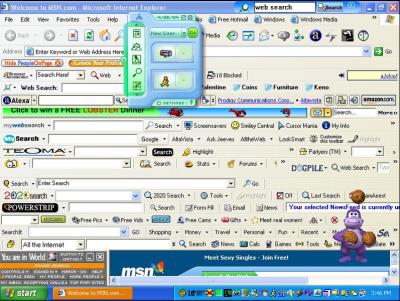
No, right? That’s what I thought! There’s no telling what may pick up your sensitive information. I don’t know. Maybe its just my overly sensitive paranoia that my sister continues to bring up but I think I have a point.
Dealing with the Paranoia
What caused the two tragedies I mentioned in the beginning? Keylogger programs. How do you prevent them from being installed? An all-in-one security arsenal or at least a planned computer defense regimen entailing anti-spyware, anti-adware, and anti-virus. Don’t do something stupid like open an email from Nigeria. Use FireFox. Don’t P2P unless you are absolutely sure that you are using the right program. But, what if you’re using a computer that belongs to somebody who does not obey these sacred rules?
You can’t trust a computer that you don’t manage. Luckily, there is a way to avoid any typical keyloggers that reside on your grandma’s computer. Its kind of low tech, but – still – its better than nothing.
How Keyloggers Work
First you need to understand how a basic keylogger works. It installs itself as a hidden service or a daemon that monitors the events passed in Windows. The bulk of these events includes keystrokes and mouse changes. With these event handlers, you can easily swipe someone’s login. In the keylogger … log, it may have something like this
“myspace.comusername@domain.com[tab]pa$$w0rd[tab][enter]”
for logins
“123-45-6789”
for socials security numbers or
“John Doe[tab]123 Easy Street[tab]Beverly Hills[tab]c[tab]90210[tab]1234567890123456[tab]345[tab]10[tab]2008”
for credit card billing information
See how easy it is for a cracker to parse your sensitive information from the log?
Exploiting a Flaw in the Exploiter
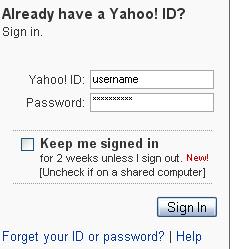 One flaw in most keyloggers is that they don’t record mouse clicks or the time of input. Most can also only determine which program is receiving the input. They cannot detect what element in the program is receiving the input or even if the program is actually using the input!
So, to scramble the logs, you enter random characters between sensitive information. At the same time, you don’t want the random characters to alter what you are actually trying to type in the form field. So, you would periodically remove focus from the desired field.
For example, imagine that your password is “pa$$w0rd.”
- Click the password field.
- Type ‘p’
- Click the background. Type some random characters. Click the password field again.
- Type ‘a’
- Click the background. Type some random characters. Click the password field again.
- Type ‘$’
- Click the background. Type some random characters. Click the password field again.
- Type ‘$’
- Click the background. Type some random characters. Click the password field again.
- Type ‘w’
- Click the background. Type some random characters. Click the password field again.
- Type ‘0’
- Click the background. Type some random characters. Click the password field again.
- Type ‘r’
- Click the background. Type some random characters. Click the password field again.
- Type ‘d’
- Click the background. Type some random characters.
If you performed this method correctly, the keyboard capture log would look something like this (without all the bolding).
p467gjaj,d7g$45fdj$dfhsdw5gndc0hgdnfrgh7kodsgreb
Works Most of the Time
Cracking this simple workaround would require more sophistication from the keylogger. At least you’ll be safe from most implementations. That sophistication would entail something with screen captures, mouse logs, and/or browser injection. However, all of these factors are very unlikely, as they would make the keylogger more conspicuous.
Next time you are on a public computer, remember this technique and don’t let them (whoever “they” are) get a hold of your information.
For more information on where I learned this technique read How To Login From an Internet Cafe Without Worrying About Keyloggers from the Carnegie Mellon University.
 View Comments from Other Readers
 Subscribe by RSS Feed
 Bookmark this on Delicious
 Stumble it!
 Furl This!
 Reddit!
October 10th, 2007 at 10:32 pm
Wow who would do such a thing!!! WOW try to keylog you?? get your aim WOW! b-tards!
October 28th, 2007 at 2:16 pm
A good keylogger will detect which page you are looking at and will keep track of the text for each application.
The simple solution is to not use any computer you do not trust. If you do not have control over the computer do not put any sensitive information into it. If you must do this then you should change the sensitive information as soon as you are finished.
Yes it is a pain, but the only real way to protect yourself.
October 30th, 2007 at 6:04 am
1. Keylogging is now a felony in most states.
2. Download the Mepis ISO, burn ISO to CDrom.
3. Insert Mepis LiveCDrom into Grandma’s spybot and virus infested computer, reboot. Guarddog is the automatic firewall.
4. Surf safely in Firefox or Konqueror.
You like the 20 thousand games, programs, Suites that are all FREE? Click on the “Install Mepis” icon on the screen, and go with the defaults.
November 1st, 2007 at 7:53 am
This trick may work once on the same computer, but it’s easy to figure out which characters keep occurring in the same order if you have multiple samples. Besides, there are plenty of keyloggers that register mouseclicks. It’s much better to set up one-time passwords if you plan to login from untrusted computers.
November 3rd, 2007 at 5:54 pm
Your gonna be vulnerable to this no matter what you type and how you type it. but most of the time key loggers leave little bits of them selves around and don’t clean up (figuratively speaking here) witch means most good antivirus protection software can stop them… they wont be looking for your AIM account unless you have been specifically targeted for one reason or another (this doesnt have to be a grudge) same goes for IRC MSN ISQ any form of E-mail, or most of anything.
they will look for credit card details most of the time, and if you enter your credit card on an untrusted computer, then your asking for it a little 😛
also Linux dose have very good defence as dose mac, this is because windows is the industry standard, and so hackers are after people who can’t use windows but try anyway, as there are a hell of a lot of them. so Linux and mac are still venerable, hackers just don’t care to try.
November 6th, 2007 at 6:14 am
try http://www.kyps.net 🙂
December 18th, 2007 at 12:13 pm
Wouldn’t mouse input using an on-screen keyboard bypass most keyloggers (as long as there isn’t a screen capture device as well). There are freeware onscreen keyboards and, XP at least, already includes one under Accessories > Accessibility. No actual keystrokes but only mouse clicks would be required for the input of sensitive information.
January 16th, 2008 at 1:14 am
Thing about on-screen keyboards is that if the logger tracks x,y coords of the mouse click, a proper analysis would reveal what was typed.
Especially if the logger also tracks active window to eliminate off-keyboard clicks.
January 25th, 2008 at 8:59 pm
first of all, if you’re OS allows things to install without your knowledge [you wouldn’t intentionally install a key-logger would you?] then you are going to get fubared either way. second, if you are paranoid enough that you think you should need to use these tricks you shouldn’t be entering sensitive data *at all*. third, a lot of these kind of programs are bundled with garbage-ware that I-D-ten-T users blindly install without a thought. solution? use common sense, be careful what sites you visit, keep your software up to date, consider alternative OSes, don’t be install-happy and for the love of Tux, don’t run *anything* under root or admin unless you absolutely positively must for the shortest time possible. otherwise you run a very real risk of getting hosed for no good reason.
July 9th, 2008 at 7:06 pm
So if they keylogger doesn’t keep track of mouseclick events, would it not screw up the keylog even more if you were to say, type in a mass of random numbers, symbols, and letters in no methodical order? Then once you type some massive list of unorderliness, click and highlight bits and pieces to type a single letter here and there along with other characters that are already inevitably typed in the barrage, thus making up the password? To be able to parse something like:
p467gjaj,d7g$45fdj$dfhsdw5gndc0hgdnfrgh7kodsgreb
might be easy if you look for reoccurring characters, however, if you were to try to parse:
ooiuw4jlkwfen98w3,Wksaorq38u4AWkua3*#,kjaseri9*&@kj#i7@Kkj7#JskasdfiAWkKAJhGEI&#$KJui7EKj#$I7jkEK#UiEKJekjersllWE:l#I&#KjISJA@HK@QKSDIUSKJFSHIE&kjdskfsjdyf9iWJK#k&SEkfjshI&#kJR&EAKLJyerI#&KSAJSDFI7ewrKJASERIs*dfKAJAREkjESIT*&sekjfIE&rkjw4osa78setyoiaw4hasdfi7EOKue4lkwj3s78KEJ&$AJKslfj3,Wksaorq38u4AWkua3*#,kjaseri9*&@kj#i7@Kkj7#JskasdfiAWkKAJhGEI&#$KJui7EKj#$I7jkEK#UiEKJekjersllWE:l#I&#KjISJA@HK@QKSDIUSKJFSHIE&kjdskfsjdyf9iWJK#k&SEkfjshI&#kJR&EAKLJyerI#&KSAJSDFI7ewrKJASERIs*dfKAJAREkjESIT*&sekjfIE&rkjw4osa78setyoiaw4hasdfi7EOKue4lkwj3s78KEJ&$AJKslfjJekjersllWE:l#I&#KjISJA@HK@QKSDIUSKJFSHIE&kjdskfsjdyf9iWJK#k&SEkfjshI&#kJR&EAKLJyerI#&KSAJSDFI7ewrKJASERIs*dfKAJAREkjoiuw4jlkwfen98w3,Wksaorq38u4AWkua3*#,kjaseri9*&@kj#i7@Kkj7#JskasdfiAWkKAJhGEI&#$KJui7EKj#$I7jkEK#UiEKJekjersllWE:l#I&#KjISJA@HK@QKSDIUSKJFSHIE&kjdskfsjdyf9iWJK#k&SEkfjshI&#kJR&EAKLJyerI#&KSAJSDFI7ewrKJASERIs*dfKAJAREkjESIT*&sekjfIE&rkjw4osa78setyoiaw4hasdfi7EOKue4lkwj3s78KEJ&$AJKslfjAJKslfj
I’m not sure if someone would have the patience to try to parse that manually. I guess really, the only REAL way of staying safe would be NOT to login/purchase on a computer that you don’t own, right?
July 20th, 2008 at 9:00 am
I need a cc cracker software
December 22nd, 2008 at 7:48 am
i have found out recently that my boyfriend of 3 and a half years has uploaded a key logging device on his computer, i found it by error.
he visits facebook all the time – some random girls i d ont know and also looks at porn. The thing is he deletes his web browsing history… but not kis key logging history. Now not sure what to do. why is he keeping tabs on me?
December 22nd, 2008 at 4:43 pm
Another way is to open (say) Notepad, type the alphabet and other random symbols, then copy and paste using the mouse.