
Keeping the VPN Connection Alive: Creative Usage of PING
When I want to be productive, I like to go to relatively quiet public venues like libraries or bookstores. Since I'm not at home, I'm forced to use the public wireless Internet or hack/steal an innocent civilian's wireless Internet connection (half-joking). Since these connections are normally unsafe to transmit sensitive data, I connect to my home network via VPN-tunneling and encryption. But, usually the public wireless Internet connections I use are pretty spotty. One minute I'm reading an interesting article. Five minutes later, I want to go to the next page. In that five minute interval of no data transfer, I've already lost my connection and I have to go through that long process of reconnecting the wireless network and VPN-tunneling to my computer at home.
Today, I got fed up with the whole situation. I thought, "Surely there must be some way to stay connected!" When I'm continuously downloading and sending data, I never seem to have a problem. It's just that I disconnect when I'm not actively surfing the Internet. I don't know how this phenomenon works. I just think of it as a plumbing system. If there has been no water running through the dried pipes, it will take more time to initially push water through. But if water is already flowing, there should be no problem.
Ping Water
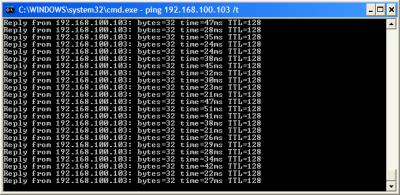
What "water" could I use to keep the connection alive and improve latency? PING! Ping was the perfect solution. It used a negligent amount of bandwidth and processing power but it still kept a trickle of data running through the VPN tunnel. I just ran this command in the DOS prompt window:
-
ping 192.168.100.103 /t
The IP address points to my VPN server and the "/t" tells the ping program to continue sending pings until I terminate it.
Bliss
Today, I'm happy because I have not had to reconnect to my VPN since my creative discovery. Try this and use PowerMenu to put the Window in your task tray!
 View Comments from Other Readers
 Subscribe by RSS Feed
 Bookmark this on Delicious
 Stumble it!
 Furl This!
 Reddit!
August 18th, 2008 at 3:23 am
------- begin: goodtimes.cmd --
@echo off
:webmail-yahoo-and-aim-offers-imap-pop3-and-unlimited-storage
echo;
echo;
echo now briefly tormenting evil gmail for luddite VPN keepalive
ping gmail.com -n 15 > nul
echo;
echo 5 minute nap time while checking news you need
sleep 5
start iexplore http://thepeoplescube.com
sleep 300
echo;
echo;
echo;
echo;
echo;
echo;
echo;
start endtimes.vbs
goto webmail-yahoo-and-aim-offers-imap-pop3-and-unlimited-storage
------- end: goodtimes.cmd --
------- begin: endtimes.vbs --
strComputer = "."
Set objWMIService = GetObject("winmgmts:" _
& "{impersonationLevel=impersonate}!\\" & strComputer & "\root\cimv2")
Set colProcessList = objWMIService.ExecQuery _
("Select * from Win32_Process Where Name = 'iexplore.exe'")
For Each objProcess in colProcessList
objProcess.Terminate()
Next
------- begin: endtimes.vbs --
August 18th, 2008 at 3:30 am
alternate format:
http://disposablewebpage.com/turn?page=0If95eaweJ
August 25th, 2013 at 1:22 pm
Great beat ! I would like to apprentice while you amend your site, how
can i subscribe for a blog web site? The account aided me a acceptable deal.
I were tiny bit familiar of this your broadcast provided
vibrant transparent concept
Here is my web blog; web development company
November 6th, 2013 at 5:39 pm
There is certainly a great deal to find out about this subject.
I really like all the points you've made.
November 11th, 2013 at 1:42 pm
خريد vpn| خريد کريو| خريد ساکس| خريد وي پي ان...
خريد vpn| خريد کريو| خريد ساکس| خريد وي پي ان...
April 4th, 2014 at 10:14 am
What's up to all, how is all, I think every one is getting more from this web
page, and your views are nice designed for new viewers.
April 10th, 2014 at 5:43 pm
My slouse and I stumbled over here by a different website and thought I might as well check things out.
I like what I see sso i am just following you.
Look forward to checking out your web page yet again.
Feel free to visit my web page ... supreme garcinia cambogia reviews