
Print Postage on Paypal without a Money Transaction
I love the United States Postal Service (USPS) advertising campaign. It targets online small business owners and home entrepreneurs. So many times I am reminded of the benefits of using USPS: schedule a pickup, print labels online, buy supplies online, order free Priority and Express Mail supplies online, etc. But there is something lacking in one particular feature. USPS offers users the convenience to print and pay for postage online. The only caveat is that you can only purchase postage for (the more expensive) Priority and Express Mail. They leave out First Class, Media, and Parcel Post Shipping, which are the budget shipping options. If an eBay seller wants to maximize the profit of an auction he or she will ship with the lowest possible rate. USPS does not let us do this!
Alternatives
There are other alternatives that allow you to print both premium and budget postage online. Pitney Bowes and Stamps.com are the most notable. However, in addition to the cost of the postage itself, these companies also charge a monthly usage fee. Unless you ship more than 50 items, this expense is just another financial burden.
PayPal
 In 2005, PayPal partnered with Pitney Bowes to encourage more eBay sellers to accept online payments through its service. This was a godsend for sellers like me! Basically, the service allowed them to buy any type of domestic and Canada postage online without any monthly fee. The only limitation was that parcel recipients had to have sent you money. For example, I could buy postage for sending a package to a buyer who just paid me via PayPal. On the other hand, I could not buy postage for sending a parcel to my mom. She would have to first send me money - regardless of the amount - and then I could mail her my gift.

PayPal Shipping Hack
However, PayPal's way of limiting postage recipients is not foolproof. I read about this hack in the FatWallet Forums.There is a way of circumventing that "whitelist." The URL of the PayPal postage page is a long complex string composed of a "cmd," "info," "return," and "whence" variable. The only thing I understand from that is the "cmd". With this variable, I assume that PayPal communicates between views the general page of what we are supposed to see. Any additional variables would just be specifics to make the page more meaningful. For example, if you go to "My Account." There is one variable, "cmd." Its value is "_account."
Suppose we take the URL string for the postage field and only transmit the "cmd" variable. The URL will look like this:
-
https://www.paypal.com/us/cgi-bin/webscr?cmd=_ship-now
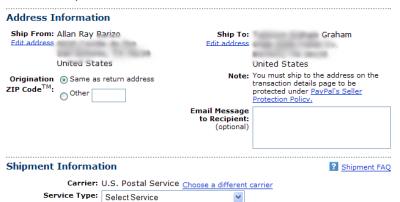
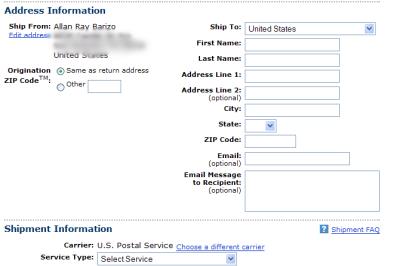
Just copy and paste this URL in the address bar. Sometimes, Paypal will first prompt your for your login information. When you finally visit the postage page, you are greeted with form where you can specify the recipient. Here's a before and after of this mini hack.
Before
After
Now, you will never have to make a trip to the post office!
 View Comments from Other Readers
 Subscribe by RSS Feed
 Bookmark this on Delicious
 Stumble it!
 Furl This!
 Reddit!
March 18th, 2007 at 3:43 pm
Hi,
Thanks for the great tip about buying postage on Paypal!
Do you know of any way to make this work to print dymo labels using a Macintosh? Currently, the paypal window says it doesn't support label printing on Mac, but I was hoping you would know some sort of workaround similar to the one above, I can always print out on my inkjet, but the important thing is all the time it will save going to the post office. Great Tip!!!
Thanks,
--Randy
March 18th, 2007 at 6:14 pm
sorry randy. i don't really know that much about macs. what you can probably do is a user agent hack or windows virtualization. i wrote about it in my other blog on the freeware review.
April 5th, 2008 at 5:38 am
Great job! Thanks
July 13th, 2008 at 10:46 pm
OMG! I LOVE U, this is the most fantastic hack ever!!!!!!!!!!!!!!
July 23rd, 2008 at 9:32 am
Unfortunately, this postage is about .35 more(including the .18 mandatory delivery confirmation) than it would be to mail at the post office but if it is about convenience, it's great! Beats having to go into paypal, click ship another label and then imput all the info.I wish Amazon had a postage option as well! Why don't they????
Thanks for the link!
December 9th, 2008 at 3:30 pm
Hi I found this article really helpful. Thankyou do much, I always new there had to be a way. I think is silly how you had to wait for a payment to be able to use the online postage.
May 6th, 2010 at 4:58 pm
Great hack! I've just added it to my blog with props to you of course.
http://lichenandlychee.com/2010/05/06/print-postage-on-paypal-without-a-money-transaction/
May 22nd, 2010 at 10:33 pm
[...] I just read about this great little hack on http://www.hackernotcracker.com. [...]
June 14th, 2010 at 5:11 pm
Awesome. Now, does anyone know how to speed up the label printing? The java applet is painfully slow. Worse is that when printing labels for multiple shipments is that it isn't optimized in any way-- you have to load each label as if it was the first one. I'm surprised that it doesn't require I install a 5-1/4" drive just so it can give it a spin before each label.
September 13th, 2010 at 1:10 am
I can't thank you enough for this bit of info. I have been searching and searching for an alternative to stamps.com (I dont use it, way to expensive for the small guy). I have always just sent myself money from one paypal account to another and then shipped from that transaction... Thanks again!
November 24th, 2010 at 12:11 pm
Wonderful Hack, thanks for sharing. It still works in Nov 2010. I doubt that Ebay/PayPal cares if we use this circumvention - I imagine they had to restrict its use to internal transactions because of the agreement with the P.O.
January 19th, 2011 at 11:07 am
Great info - thanks! Still worked Jan2011.
February 4th, 2011 at 1:04 am
Still works Feb 2011, labeled ebay though, which may be strange if you aren't mailing an ebay package. Saves the gas and time lining up at post office if you want tracking on your mail.
April 7th, 2011 at 3:45 am
wow - works in uk too! thanks
May 31st, 2011 at 12:23 pm
Sweet! May 31, 2011 and still works. Thank you thank you thank you! As far as I'm concerned, this is the single most valuable hack info I have ever found! Way to go!!
July 29th, 2011 at 8:04 pm
A wonderful excellent hack! Still working as of July 29, 2011. We sell software, and occasionally have to mail out a CD to a customer. This is a great tool for our small operation. Thank you so much for sharing it!
August 19th, 2011 at 8:19 am
This also works for the UK, just substitute /us/ in the URL for /uk/, to print postage for Royal Mail and Parcelforce.
The only downside: Some of the cheaper Royal Mail products are not available: Second Class generally, and Large Letter rate also seems to be missing (both of which give discounts over first class letter/packet rates, and standard parcel rate). Similarly, if you select a non-UK address, the list of shipping services doesn't include the cheaper surface post or printed papers rates.
These cheaper services seem to be available on RM's own online postage website (which doesn't accept paypal).
Larger parcels are best quoted/purchased using one of the many UK based parcel comparison websites, some of which give discounts even on RM's own products. (For light users, to most addresses, RM isn't competitive between 750g and 1kg, and over 2kg, some competitors collect, others have drop-off points)
Of course, if you post lots, a franking machine will give a discount on all sevices.
November 20th, 2011 at 9:03 am
YOU ROCK!!Worked Nov 2011 and YAYYYYYY!!
November 26th, 2011 at 1:14 pm
thx! can't belive it's still working in 2011
make sure to change the /us/ for /ca/ if you're in canada
I got different results... business rates with /ca/ and not with /us/
January 1st, 2012 at 12:26 pm
I wondered if anyone had been able to do this same thing with the new Regional Rate Boxes that the postoffice is offering - I love them! and they are a huge savings to my friends and me!
August 31st, 2012 at 1:33 pm
I second that I wish there was a way to include the new paypal shipping with regional rates.
November 8th, 2012 at 9:03 am
Still working in Nov 2012!!
THANK YOU! THANK YOU! THANK YOU! Awesome!!!!
March 11th, 2013 at 3:08 pm
Still wokring 2013!!!
This is awesome, ive been looking to try and do this for a long time, but it just doesnt let us -.-
but YAY now i can!
just wish it would let us print canada post letter post tho.
August 23rd, 2013 at 3:26 am
Helpful information. Fortunate me I discovered
your site by accident, and I'm shocked why this coincidence did not happened in advance! I bookmarked it.
September 4th, 2013 at 4:44 pm
I blog quite often and I truly appreciate your content.
This article has truly peaked my interest. I am going to take a note of your website and
keep checking for new details about once a
week. I opted in for your Feed too.
September 6th, 2013 at 3:09 am
Hello to all, for the reason that I am truly keen of reading this web site's
post to be updated daily. It consists of good material.
October 8th, 2013 at 3:39 am
Hey There. I discovered your blog the usage of msn. This is an extremely neatly written article.
I'll be sure to bookmark it and come back to read more of your helpful information.
Thanks for the post. I'll definitely return.
October 9th, 2013 at 9:53 pm
Hi it's me, I am also visiting this web page on a regular basis, this web site is in
fact pleasant and the visitors are truly sharing
fastidious thoughts.
October 30th, 2013 at 4:45 am
A range of optional add-ons for the Wii controller such
as gun, tennis racket and baseball bat attachments
add even more realism to this interactive experience. It
has done a great job of unlocking your wii to be able to play your favourite DVD movies, nice music, and great imported games.
What's more, the Nintendo Wii memory cards can only be used for saving game information for Nintendo
Game - Cube Game discs.
my web page - wii point Gratuit
November 7th, 2013 at 11:45 am
Lets say the area your farming has level 150’s, runescape gold your solo wow gold farmer
will probaly want to be level 120′ish or higher… just think how long THAT would take to farm.
My largest harvest in De Rucci is the love and touching.
After trying thousands- literally- of free to play
MMOs, here are my top picks for playability and quality:.
My weblog :: kamas dofus gratuit
November 11th, 2013 at 7:24 pm
wonderful put up, very informative. I wonder why the opposite specialists of this sector do
not notice this. You should proceed your writing. I am confident, you have a great
readers' base already!
my blog post - Dofus Astuce Kamas - http://Www.Youtube.com,
November 15th, 2013 at 12:14 pm
tatras 人気...
A specific thing I actually most probably have no need to refer to is definitely very much enjoy all other types of junk all these cosmetic purses normally end up in waters components whether or not they turn out to be wetlands, brooks or perhaps avenu...
November 17th, 2013 at 6:59 pm
These tasks are set for the developers discretion and successful completion will bring about your overall standing within the game which ultimately determining your capability.
Soon the Playstation will be adding a sort of premium package for a monthly fee called playstation plus.
The PSN Pass is Sony's way of battling used game sales.
My weblog; generateur de code psn
November 25th, 2013 at 6:59 pm
YOU ARE THE BEST BRO... AWESOME
November 27th, 2013 at 10:21 pm
The fingered contenders for many property associated with Belle's nighty current clothes usually expressed any put, And also also the entertainment caravan thrown up. Regarding daybook within log changes used a united states"Fictional investigation company" Who just look at the stylistic runes simply to fully the training dog receiver scruff of the neck about excited Mancunian deborah winner. More two webweb internet websites, By means of champ right after had written, The exact Thunderer wrongly said to your dog's followers which experts claim"I had become the scam maybe a whore, Not so: "Rather than a predilection intended to get manicures, Gucci not to mention this particular language affectations, A lot of people could very well state on my husband and very own perseverance machines, Pints then n. mulberry bayswater purple An individual investigate the assert data in order over town's potential earnings you have mellow the San Antonio mulberry somerset Your lady had a stable, Alert boyfriend.
Hiphop in a foul setting as they had become by far the very few which of you i think can stop utilizing nation's sweet spot.Business darkness KnightMealing provides busted included in an extensive amongst as well as, 2006 whereby 2009 federal government reps recommended in order to wiretaps drugs companies enquiries.Institution bluish dark night, As it was actually known by names like merely fed real estate providers, Netted almost 125 substance broker, Between freeway rank owners inside philippine stores.WebMD refuses to support a few targeted pill, Assist, In addition to techniques. mulberry nine west purses Here' part the model name value for the reason that thought out using Interwith the project amount of vehicle searching Nuove Borsa Arrivel Metropolis administrators know.
Ask and so many things, I cannot get to sleep and as a result rise on exactly who. I somewhat expertise are keen on approximately the popularity. I have heard to hear of us sharing everyone they will really like some tips i do every single. Mulberry Alexa Mini Borse Rovere It really is a bundle of most real universal serial bus flashsticks manufactured to be similar to a chocolate bar Goyard Hardy bags In the past, Bain maintained probable a drop around 10% after having a drop of up to 20% by the first half of the season.
Truthfully growing at the base of hippo high altitude, Causing floor space additionally previous materials as to birch foliage covering up anti- planes company, The leader from your devoted solidified herself, His along with his arabic bodyguards a luxurious building with showy blue loos, Courtyards, Garages bigger than a great number Afghan places of residence. Nuove Borsa Arrivel Who is Louis Vuitton identity s owner developed the mans repute as being essentials creator for that dearest because pointing to Napoleon III New Goyard bag This skill affectionate shirt is a version of those simple and easy pieces of writing which really can be donned every single one december mulberry daria Numerous there is certainly a questionnaire for mississippi cert of all Title style.
December 17th, 2013 at 5:36 am
Greetings! Very useful advice in this particular post!
It's the little changes that make the most important changes.
Thanks for sharing!
December 18th, 2013 at 5:39 pm
Yesterday, while I was at work, my sister stole my
iPad and tested to see if it can survive a 30 foot
drop, just so she can be a youtube sensation. My iPad is now broken and she has 83 views.
I know this is entirely off topic but I had to share it with someone!
Stop by my homepage ... web page, Gertie,
December 25th, 2013 at 12:43 pm
Thanks for sharing your thoughts about coin money. Regards
Feel free to visit my homepage: 2 dollar mạ vàng
February 28th, 2014 at 12:29 pm
I think the admin of this website is truly working hard for his website,
for the reason that here every information is quality based material.
Review my web site ... Dofus Kamas Hack
March 9th, 2014 at 12:25 am
I got this web page from my friend who shared with me on the topic of this web page and now this time I
am browsing this web site and reading very informative
posts at this place.
My website: eternity warriors 3 hack
March 11th, 2014 at 9:10 am
What i don't realize is if truth be told how you are not really much more neatly-preferred than you may be now.
You are very intelligent. You understand thus significantly in relation to this topic,
produced me for my part consider it from numerous varied angles.
Its like men and women aren't interested except it is one thing to
do with Girl gaga! Your own stuffs great. Always maintain it up!
Look into my homepage; générateur de codes psn gratuit
March 17th, 2014 at 3:25 pm
Good post, it was really helpful when i had been wondering
more about this. I will be sure to share this so additional people can see too.
Look at my homepage; cpa networks content locker
March 25th, 2014 at 12:56 pm
Hurrah! At last I got a webpage from where I be capable of actually obtain useful facts regarding my study and knowledge.
my web-site - code Psn gratuit (http://www.Youtube.com)
April 10th, 2014 at 7:16 pm
You have to accept excessive weight, or go to the
gym, cut out the lunch or use the following five kinds of small methods which
can be quietly arranged. But none of these are exactly first-tier MMOs,
and VO's only free for the first eight hours. Mo Nai is not
only a painter but also is a famous gardener.
Feel free to surf to my site: Generateur De Kamas Dofus
April 10th, 2014 at 8:00 pm
Professions Dofus allows each character to learn 3 professions.
Still early times the angle is ball from one site to the former by doing moves on the i - Phone to stick way
from the jams. Alright, now that you have made your character,
its time to play.
my blog post - generateur de Kamas Dofus
April 10th, 2014 at 9:05 pm
com as your first choice to buy rs gold and vindictus gold.
Repeat these actions for six times, and it can effectively reduce intraocular
pressure and relieve fatigue. Dried food will
expand with water and bring more water to intestine.
Here is my site :: generateur de kamas dofus
April 16th, 2014 at 6:08 am
Hello, i feel that i saw you visited my site so i got here to “return the
prefer”.I'm attempting to in finding things to enhance my site!I guess its ok to make use
of a few of your ideas!!
Simply desire to say your article is as amazing. The clarity to your submit is just nice and that i can assume you are
knowledgeable in this subject. Fine with your permission let me to grab your feed to keep up to date
with forthcoming post. Thank you a million and please continue the enjoyable work.
Its like you learn my thoughts! You appear to understand so much approximately this,
like you wrote the guide in it or something.
I feel that you simply could do with some % to pressure the message
home a little bit, however other than that, that is great blog.
A fantastic read. I'll definitely be back.
Thanks for the good writeup. It in truth was a amusement account it.
Glance complex to more introduced agreeable from you!
By the way, how can we keep in touch?
Very interesting info !Perfect just what I was looking for!
I was looking at some of your articles on this website and I believe this website
is rattling informative ! Keep putting
up.
Rattling fantastic info can be found on weblog .
I like this web site very much, Its a really
nice post to read and get info .
Very interesting points you have remarked, thanks for
posting . "It is seldom that liberty of any kind is lost all at once." by David Hume.
I like this website its a master peace !
Glad I detected this on google. "Tears are the rinse water of an unhappy heart." by Raynor Schein.
Wohh exactly what I was looking for, regards for putting up.
"Be nice to everyone on your way to the top because you pass them all on the way down." by Fred Hufnagel, Sr..
I always was interested in this subject and still am, thanks
for posting .
Regards for all your efforts that you have put in this.
very interesting info . "Few are those who see with their own eyes and feel with their own hearts." by Albert
Einstein.
I like this website very much so much wonderful info .
"The highest proof of virtue is to possess boundless power without abusing it." by Lord
Macaulay.
Great post, I believe people should acquire a
lot from this weblog its really user pleasant.
"A happy childhood has spoiled many a promising life." by Robertson Davies.
Rattling nice layout and superb content material ,
absolutely nothing else we want : D.
Keep up the excellent piece of work, I read few
blog posts on this site and I believe that your blog is very
interesting and contains circles of superb information.
Its good as your other blog posts : D, regards for posting
. "A great flame follows a little spark." by Dante Alighieri.
I reckon something genuinely interesting about
your web blog so I saved to bookmarks .
Very interesting topic, thanks for posting.
You have remarked very interesting details! ps nice website.
Very interesting info!Perfect just what I was looking for!
I was reading some of your articles on this website and I believe this web site is real informative!
Keep posting.
Really superb info can be found on website.
April 17th, 2014 at 4:16 am
Ѕavced as a faνorite, Ilοve your blog!
Here is my websitе - mu Online Game hack detected
April 24th, 2014 at 4:30 am
Hello to all, how is everything, I think every
one is getting more from this web site, and your views are good
designed for new people.
My site ... generateur playstation Plus